How to Migrate from Mailman 2 to Mailman 3: A Complete Guide
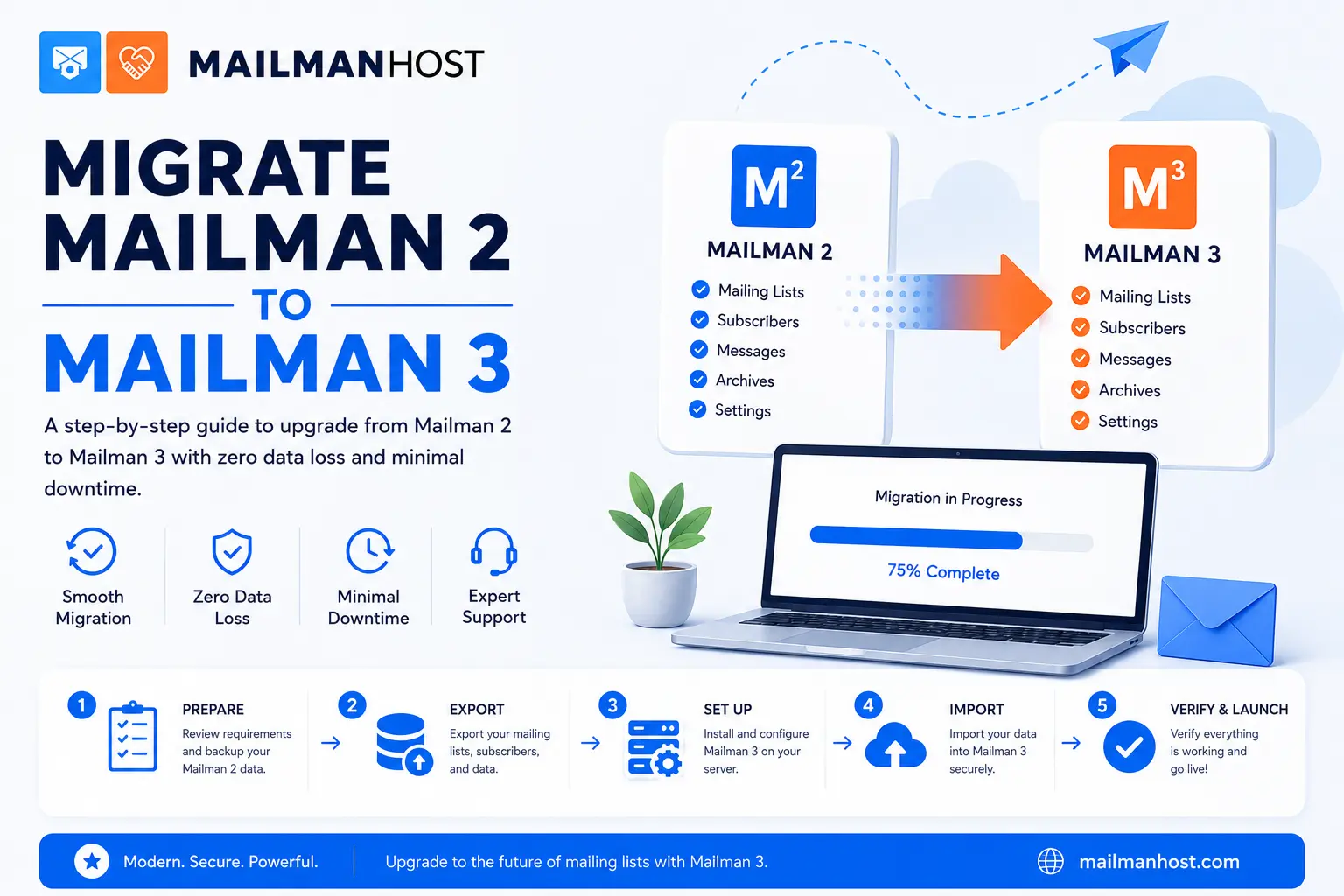
If you are still running Mailman 2, you are not alone, and you are not behind. Mailman 2.1 has quietly delivered billions of list messages over two decades. But Mailman 3 is now the actively developed release, with a modern web interface, a searchable archive, and a REST API that older versions simply cannot offer. This guide walks through how to migrate from Mailman 2 to Mailman 3 without losing your lists, your subscribers, or your archive history.
Whether you plan to run the migration yourself or hand it to a managed host, understanding each step helps you avoid the two things every list owner fears: dropped subscribers and broken archive links.
Why migrate to Mailman 3 at all?
Mailman 2 still works, so the honest question is what you gain. The short answer is a completely rebuilt platform:
- A modern admin interface. Mailman 3 replaces the dated CGI admin pages with Postorius, a clean Django-based web app for managing lists, subscribers, and moderation.
- A real archive. HyperKitty turns your flat pipermail archives into a searchable, threaded, forum-style reading experience.
- A REST API. Mailman 3 Core exposes everything through a documented API, so you can automate subscriptions and integrate the list with your own systems.
- Better DMARC handling. Modern deliverability protections are built in, which matters more every year. See our guide to mailing list deliverability for the details.
If you are weighing whether the jump is worth it, our side-by-side breakdown of Mailman 2 vs Mailman 3 lays out the trade-offs feature by feature.
Understand the architecture before you start
Mailman 2 was a single monolithic application. Mailman 3 is a suite of cooperating components, and knowing the pieces makes the migration far less mysterious:
- Mailman Core is the backend daemon that handles subscriptions, message delivery, bounces, and moderation. It has no web pages of its own; everything talks to it over the REST API.
- Postorius is the Django web frontend for list administration and member self-service.
- HyperKitty is the official archiver and the searchable web archive.
- mailman-web is the Django project that bundles Postorius and HyperKitty together behind one site.
Because these are separate services, a migration is really two migrations running in parallel: moving list configuration and members into Core, and moving archives into HyperKitty.
Step-by-step: migrating Mailman 2 to Mailman 3
1. Take a full backup first
Before touching anything, back up your Mailman 2 installation completely. That means the lists/ directory (list configuration), the archives/ directory (pipermail archive data), and your data/ directory. Do not delete the old installation once the migration appears to work. You may need the original list config files if an import needs manual correction.
2. Stand up a working Mailman 3 suite
Install and configure Mailman Core, Postorius, and HyperKitty and confirm the plumbing works end to end before importing anything. Send a test message through a throwaway list, confirm it is delivered, and confirm it appears in the HyperKitty archive. Migrating into a broken install just multiplies the debugging.
3. Import each list’s configuration and members
Mailman 3 ships a management command that reads a Mailman 2.1 config.pck file and recreates the list in Core, including its settings and its full member roster:
mailman import21 mylist@example.com /path/to/mailman2/lists/mylist/config.pckRun this once per list. It creates the list in Core (if it does not already exist), then copies subscribers, moderation flags, and most configurable options. Review each list afterward in Postorius, because a handful of Mailman 2 settings have no direct Mailman 3 equivalent and are simply skipped.
4. Import the archives into HyperKitty
Archives are handled separately by HyperKitty’s import command, which reads the raw mbox files from your old pipermail archive:
python manage.py hyperkitty_import -l mylist@example.com /path/to/archives/private/mylist.mbox/mylist.mboxOne important reassurance: importing archives with hyperkitty_import never sends outgoing email. It only reads historical messages into the archive database. Your subscribers will not be re-notified about years of old posts.
5. Rebuild the search index
After importing, tell HyperKitty to index everything so the archive is searchable:
python manage.py update_index_one_list mylist@example.comOn large archives this can take a while. Let it finish before you announce the new archive URL.
6. Cut over mail delivery and update your links
Once every list and archive is verified in Mailman 3, repoint your mail transfer agent (Postfix or Exim) at Mailman Core and update any public links from the old pipermail URLs to the new HyperKitty ones. Keep the Mailman 2 box reachable for a short grace period so nothing 404s while search engines re-crawl.
Common migration pitfalls
- Archive URL changes break inbound links. Pipermail and HyperKitty use different URL schemes. Set up redirects so existing links and search results still resolve.
- Skipped settings. A few Mailman 2 options do not map cleanly. Always spot-check moderation, privacy, and digest settings in Postorius after import.
- Encoding gremlins. Very old archives sometimes carry inconsistent character encodings that can trip the import. Keeping the original mbox files lets you re-run a clean import per list.
- Underestimating index time. On lists with hundreds of thousands of messages, indexing is the slow part. Plan the cutover around it.
Should you migrate yourself or use a managed host?
A single small list is a reasonable weekend project. A dozen active lists with decades of archives, custom moderation, and deliverability requirements is a different story. The migration is not conceptually hard, but the details, encoding edge cases, DMARC configuration, and index tuning, are where hours disappear.
This is exactly what managed Mailman hosting exists for. At MailmanHost we migrate lists and archives for you, preserve your subscribers, set up redirects, and hand you a working Mailman 3 suite with our Affinity admin interface and Empathy archives on top of the standard stack. If you would rather not spend the weekend in a terminal, contact us for a migration quote or see our hosting plans.
Frequently asked questions
Will my subscribers be lost during migration?
No. The mailman import21 command copies your full member roster, including moderation and delivery flags, from the Mailman 2 config.pck file. Always verify the roster in Postorius after import.
Does importing archives email my members?
No. HyperKitty’s hyperkitty_import reads historical messages directly into the archive database and never sends outgoing mail, so members are not re-notified.
Can I run Mailman 2 and Mailman 3 side by side?
Yes, and you should during the cutover. Keep the old installation available until every list and archive is verified on Mailman 3 and your redirects are in place.
How long does a Mailman 2 to 3 migration take?
Configuration and member import is fast, often seconds per list. The time sink is importing and indexing large archives, which can run for hours on lists with hundreds of thousands of messages.
Ready to move to Mailman 3 without the headache? Explore MailmanHost plans or talk to our migration team.